
The screenshot that changes how you look at YouTube
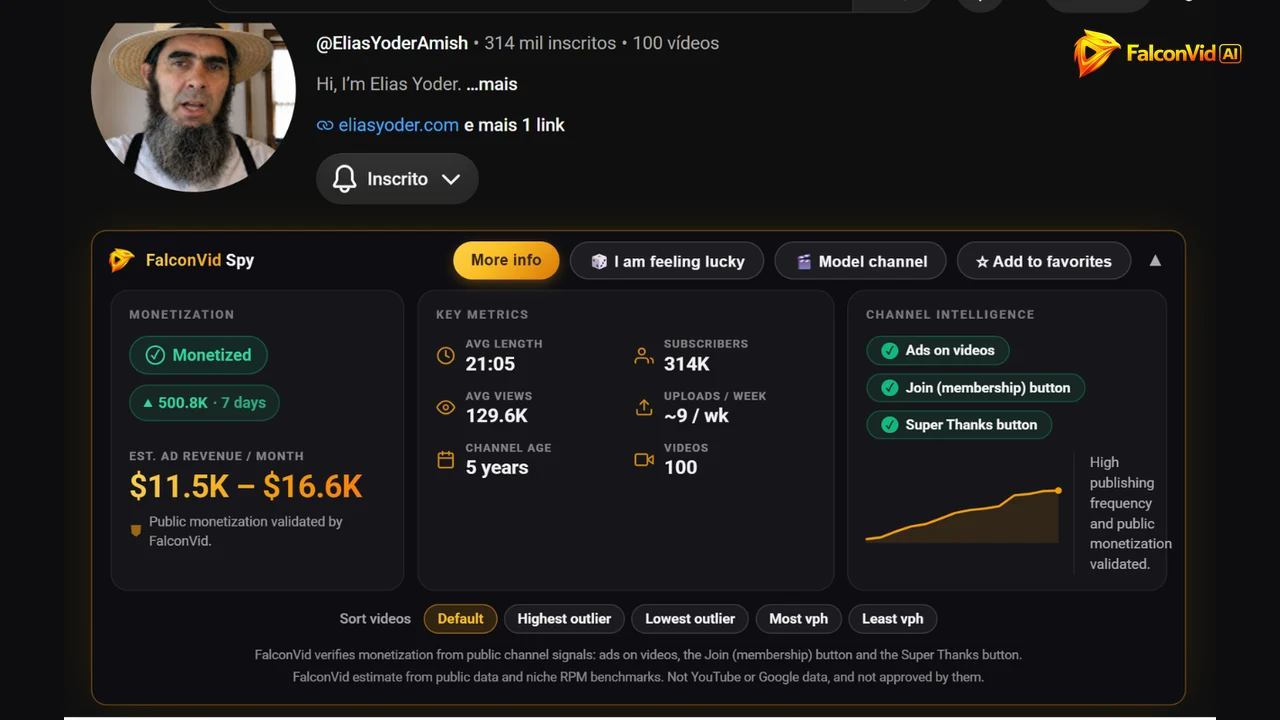
You open a YouTube channel. Any channel, any niche. Under the channel name a bar loads, and in about one second you see the thing YouTube never shows you: whether that channel makes money, and roughly how much.
The badge says Monetized, with the last 7 day view delta beside it: 500.8K. Under EST. AD REVENUE / MONTH, a range: $11.5K to $16.6K.
No spreadsheet, no course, no consultant. That is the point of FalconVid for YouTube, the free Chrome extension: it turns YouTube itself into your research panel, and the data comes to you.
Here is the part that stings: while you cannot see this, you publish into the dark and call it strategy. Install the extension, open three channels in your niche, and you learn more in ten minutes than in your last ten uploads.
- Monetized: verified through public signals on the channel itself.
- EST. AD REVENUE / MONTH: $11.5K to $16.6K, a FalconVid estimate.
- 314K subscribers, 129.6K average views per video.
- 21:05 average length, around 9 uploads per week.
- 5 years old, 100 videos published.
Why almost every channel dies before the first dollar
The mistake is rarely laziness. People who quit YouTube worked hard. They worked hard blindfolded, which is a different and far more expensive problem.
The sequence never changes. You pick a niche because you like it, produce ten videos, see nothing move, decide YouTube is saturated and stop. Notice what got tested there: not the niche, only your stamina.
Now price it. A well made long form faceless channel video takes 6 to 10 hours by hand. Ten videos is 60 to 100 hours, two and a half months of weekends, spent to discover the niche never paid.
The informed version takes 20 minutes. Open five channels with the extension running and read the monetization badge, the revenue range, the average views and the upload frequency. Nothing monetized at a level you would accept? Walk away before recording a second. Twenty minutes against a hundred hours, with a free tool.
- Research and script by hand: 2 to 4 hours per video.
- Narration and cleanup: 1 to 2 hours.
- Media selection and editing: 2 to 3 hours.
- Thumbnail, SEO and upload: about 1 hour.
- Ten blind videos: 60 to 100 hours, zero evidence the niche pays.
Everything the extension does, button by button
The bar is not decoration: four blocks of decision data plus a set of actions, on the channel page, without you clicking anything.
MONETIZATION shows the Monetized badge and the 7 day view delta, 500.8K in 7 days. EST. AD REVENUE / MONTH shows the range. Here is the rule we never hide: monetization is verified through public channel signals, meaning ads running on the videos, the Join membership button and the Super Thanks button. Revenue is a FalconVid estimate built from public data and niche RPM benchmarks. It is not YouTube or Google data and it is not endorsed by them.
KEY METRICS gives you AVG LENGTH, AVG VIEWS, CHANNEL AGE, SUBSCRIBERS, UPLOADS / WEEK and VIDEOS. CHANNEL INTELLIGENCE breaks the signals apart one by one and adds a frequency chart with a plain text reading of what the channel is doing.
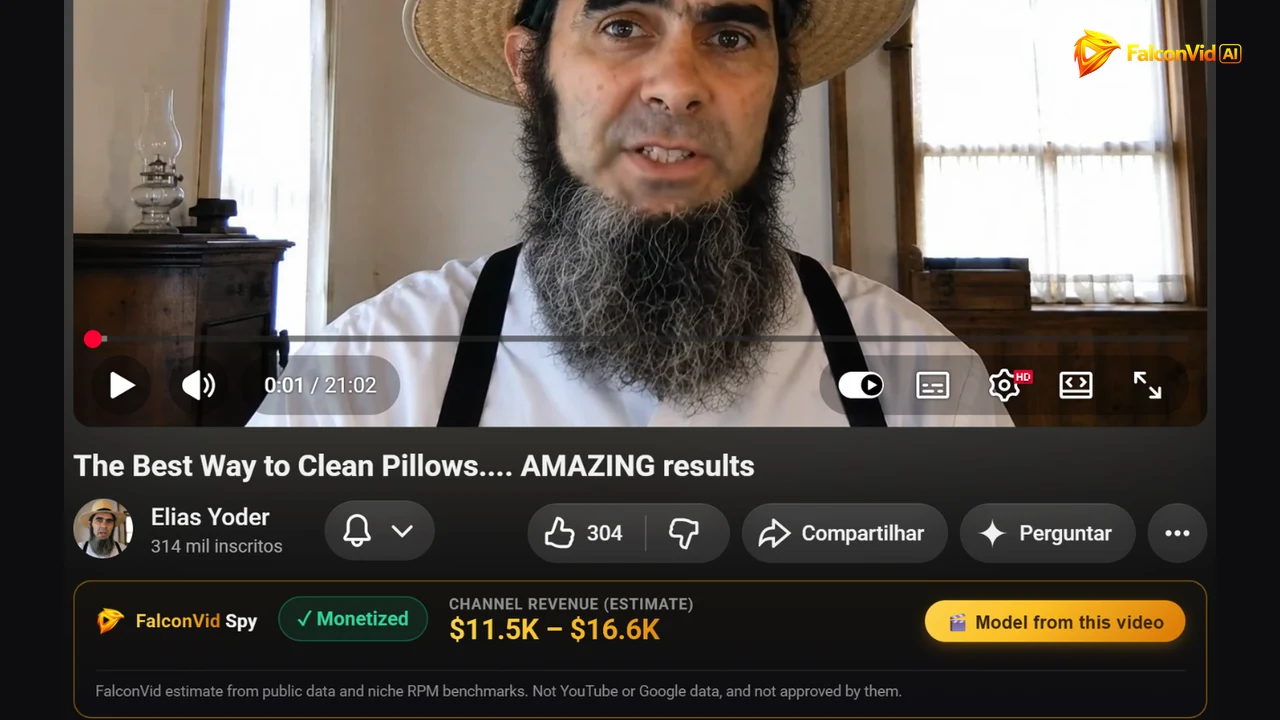
Then the actions. I am feeling lucky drops you on a channel that already monetizes, which is how you find a niche when you do not know what to search for. Model channel sends it into FalconVid, and Sort videos reorders the grid instantly. The bar appears on video pages too, with Monetized, CHANNEL REVENUE (ESTIMATE) and Model from this video. Three clicks on the Chrome Web Store, free.
- MONETIZATION and EST. AD REVENUE / MONTH: the badge, the 7 day view delta and the estimated range.
- KEY METRICS: AVG LENGTH, AVG VIEWS, CHANNEL AGE, SUBSCRIBERS, UPLOADS / WEEK, VIDEOS.
- CHANNEL INTELLIGENCE: Ads on videos, Join button, Super Thanks button.
- Buttons: More info, I am feeling lucky, Model channel, Add to favorites.
- Sort videos: Default, Highest outlier, Lowest outlier, Most vph, Least vph.
Outlier and vph: the metrics that separate luck from method
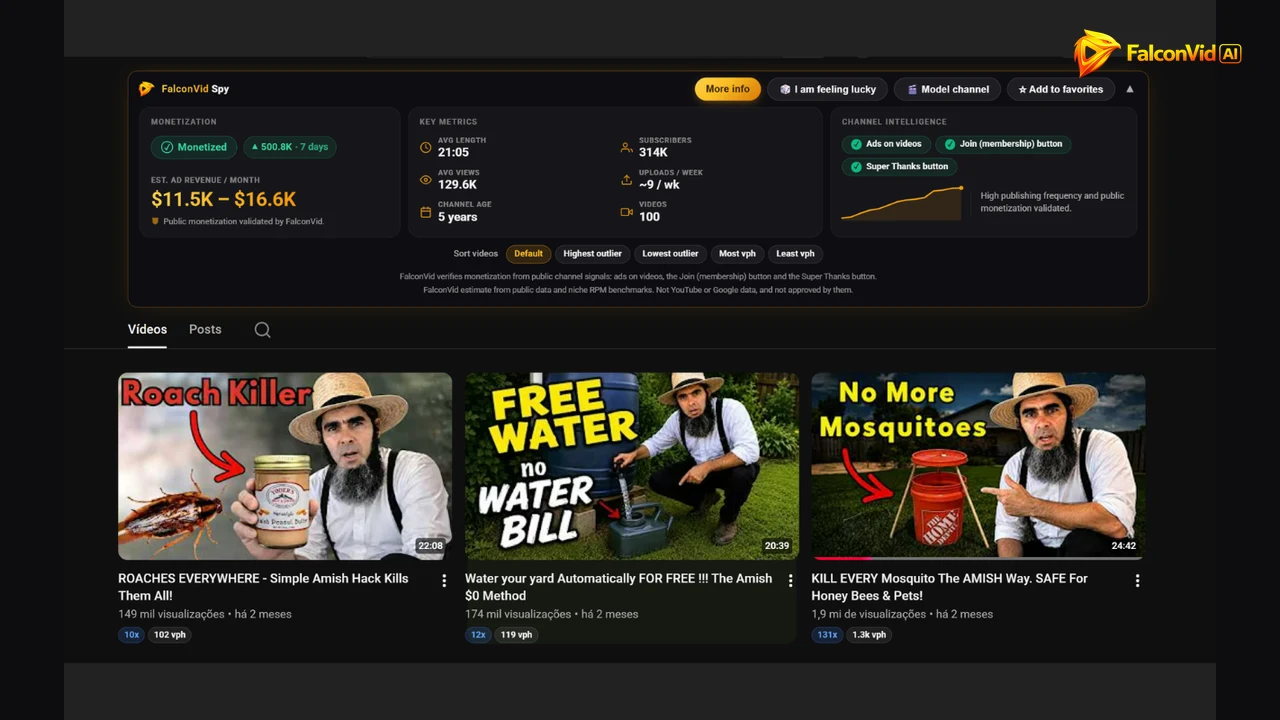
Outlier answers one question: how many times did this video beat the average of its own channel. A 10x on a channel averaging 100K views is a video with a million views. Not a compliment, proof the audience wanted that exact topic.
In a real grid you see badges like 10x with 102 vph, 12x with 119 vph, and 131x with 1.3k vph. That last one has 1.9 million views on a channel where nothing else came close.
vph is views per hour since publication, the timing metric. 102 vph is healthy. 1.3k vph is a rocket happening right now. Sort by Most vph and the channel tells you what its audience is consuming this week.
Together they replace hunches with an editorial plan. Outlier gives you the TOPIC, vph gives you the TIMING, and the intersection is the video to produce tomorrow. With FalconVid you can have it tomorrow, in up to 30 minutes. One case inside Spy settles the argument: Blunderful History, 85 subscribers, 449.4K average views, 3 videos, outlier 999x. Subscribers are not the asset. Views are, because views are what AdSense counts.
- Outlier: how many times a video beat its own channel's average.
- vph: views per hour since publication, the metric that says now.
- 10x with 102 vph is a durable performer worth modeling.
- 131x with 1.3k vph on a 1.9 million view video is a topic exploding live.
- Blunderful History: 85 subscribers, 3 videos, 449.4K average views, 999x.
The 20 minute daily routine that actually builds the 10K
Nobody reaches ten thousand a month on one brilliant idea. They reach it with a boring habit repeated for months. Twenty minutes a day inside the FalconVid Spy panel is that habit.
FalconVid Picks is the hand curated list, with the Hand-picked seal, a blowing up badge and sorting by Blowing up or Normal order. Each card shows Monetization, Est. profit/mo, Subscribers, Avg Views, Videos, Avg Length, a multiplier such as 19.2x, and a written FalconVid Analysis with a View full analysis link.
Picks by Niche groups those channels by market with each one's average earnings: Comedy with 8 channels averaging roughly $1.2M a month, Finance and Money with 25 channels, Luxury and Cars with 13. This is where you choose where to play, and that choice beats any editing skill.
Outliers gives you 50 channels performing far above their size, with presets All, Small Giants, New (<90d) and High Frequency, a Videos or Shorts switch and Min Outlier at 2x. New (<90d) is the gold mine: a channel under 90 days old already breaking out proves the niche is open now, and open niches do not stay open forever.
Favorites holds what you starred, including channels starred straight from YouTube, while Search, Trending and Alerts close the loop. Run the clock every day. It is the routine, not the talent.
- 5 minutes in Outliers with New (<90d): niches opening right now.
- 5 minutes in Picks by Niche and FalconVid Picks inside your market.
- 5 minutes in Favorites, checking what moved since yesterday.
- 5 minutes writing the 3 topics you will produce next.
- Twenty minutes, every day, before you touch anything else.
How to read a card in 15 seconds and decide
A routine you cannot finish in 20 minutes is a routine you abandon by week three. So compress the decision into five checks.
Is it monetized? If not, the rest of the card is entertainment. Is Est. profit/mo in a range that would change your month? Does Avg Length match the format you will run? A 21 minute documentary and a 4 minute list channel are different businesses.
Is Uploads / week a cadence you can sustain? Nine uploads a week by hand is a fantasy unless production is automated. Then channel age, with the rule worth tattooing: a new channel with a high outlier is an opportunity, because the niche accepts newcomers today. An old one proves the niche survives time.
This is where FalconVid saves the analysis work. The FalconVid Analysis on every card explains why that channel performs, and View full analysis opens the reasoning. You get the interpretation, not raw numbers.
- Monetization: yes, or move on.
- Est. profit/mo: inside the range that would change your month.
- Avg Length and Uploads / week: a format and cadence you can sustain.
- New channel plus high outlier: the niche is open now.
- Old channel plus high outlier: the niche survives time.
The honest math behind ten thousand dollars a month
No romance here, only arithmetic. Revenue is views multiplied by RPM, and RPM swings brutally by niche and audience country. Finance and business aimed at the United States pays far more per thousand views than entertainment.
Run the three columns. At $3 RPM you need about 3.3 million views a month for $10,000. At $8 RPM, 1.25 million. At $12 RPM, around 833,000. Same goal, three workloads, all decided the day you picked the niche. That is why the extension comes before the camera.
Now convert views into production. Twenty videos a month at 40,000 average views is 800,000 views. Sixty videos a month, two a day, at the same average, passes 2.4 million. Nothing changed about your talent. Only volume changed.
So say it plainly: the lever is VOLUME multiplied by TOPIC ACCURACY. Spy solves accuracy, because outlier and vph tell you what to make. FalconVid solves volume, because AI specialists work in parallel and each video lands in up to 30 minutes. By hand, those 60 videos cost 360 to 600 hours a month, out of the 720 that exist. Nobody hits that cadence manually.
- $3 RPM: about 3.3 million views a month for $10,000.
- $8 RPM: about 1.25 million views a month.
- $12 RPM: about 833,000 views a month.
- 20 videos a month at 40,000 average views: 800,000 views.
- 60 videos a month: over 2.4 million views, or 360 to 600 hours by hand.

From screenshot to live channel: model, do not copy
You found the channel. Now the gap most people never cross: turning a good reference into a channel of your own that publishes tomorrow.
Model channel on the channel bar, and Model from this video on a video page, send the reference into FalconVid. The platform reads the DNA, meaning niche, tone, title patterns and pacing, then generates YOUR channel identity: logo, profile picture and cover, in 1 to 2 minutes, with 1 free channel style generation and no subscription.
Now the line you must not cross. Modeling copies the STRUCTURE that works: format, duration, type of hook, publishing frequency. It never means copying the video, the script, the artwork or the brand. Reuploading or rewriting someone's content earns a strike and can take your channel down.
Modeling structure is what every studio has always done, and nobody gets sued over a three act structure. FalconVid stays on that side of the line: original research, original script, original narration, on your topics, in the pattern of the reference. Find a monetized channel, read its outliers, click Model channel, approve the identity.
What happens after you approve the calendar
This is where we sell without apologizing, because this is what turns research into revenue. You approve the calendar. FalconVid produces.
Inside the platform, AI specialists work in parallel: researcher, scriptwriter, narrator, editor and sound designer, all at once instead of in a queue. A finished long form video comes out in up to 30 minutes. Narration runs in 63 languages with ultra realistic premium voices, plus voice cloning, and publishing goes to 5 networks: YouTube, Instagram, TikTok, Rumble, Facebook.
Around that core sit the things people normally buy four tools for. Automatic 9:16 Shorts with karaoke captions in 15+ styles. Video SEO. Automatic comment replies. Automated channel creation. Channel DNA, so the identity never drifts. And if you want a face on screen without showing yours, build an ai avatar with lip sync.
Worried about handing the wheel to a machine? That is what the Studio is for: watch the V1, shorten the intro, swap media, change the music, or open the timeline. Every plan includes every creation feature, so what changes between plans is volume, channels, concurrency, the AI Senior Analyst from Pro up with a 7 day trial on Starter, and support.
Then the multiplier almost nobody uses. Finished a video in English? Duplicate it into any of the 63 languages and pay only the difference, because the generated media is reused.
What it actually costs to run this
Transparent numbers, because vague pricing is how people get burned. You buy credits and spend them per video, and the cost depends on the quality mode. For a 12 minute long form video: economy 1,584 credits, balanced 9,000, premium 27,084. Always read the volume next to the mode, because a number without its mode is a lie.
Starter includes 15,000 credits, 1 channel and 2 concurrent generations: around 4 videos a month mixing economy with one in balanced, or 9 in pure economy, 2 hours of video. Pro includes 30,000 credits, 5 channels and 5 concurrent generations: 18 videos in economy, 3 in balanced or 1 in premium.
Above that: Business with 95,000 credits and 10 channels, Agency with 190,000 and 25 channels, Scale with 320,000 credits and 50 channels. Packs never expire: Boost 2,000 credits, Power 6,000, Mega 14,000. Annual comes with 2 months free.
Now anchor it. A freelance editor charges $100 to $200 for one long video, editing alone. Twenty videos a month is $2,000 to $4,000. Pro is available. The risk is capped on purpose: a free plan with 4 videos a month and no card, cancel anytime.
- 12 minute video: 1,584 credits in economy, 9,000 balanced, 27,084 premium.
- Starter: 1 channel, 2 concurrent generations, around 4 videos a month mixing modes.
- Pro: 5 channels, 5 concurrent generations, 18 videos in economy, 3 in balanced or 1 in premium.
- Business with 10 channels, Agency with 25, Scale with 50 channels.
- Freelancer: $2,000 to $4,000 a month for the same 20 videos.
The 5 mistakes that make people quit in month 2
Month two is where channels die. Not month one, when motivation still pays the bills, and not month six, because almost nobody gets there. Month two, when the first numbers arrive small.
Picking a niche by taste instead of data is mistake one, and the fix is free: check that monetized channels with an acceptable Est. profit/mo exist there. Publishing little is mistake two. Four videos a month is a rounding error, and FalconVid removes the excuse, because volume is a plan setting, not a personal sacrifice.
Switching niches every three videos is mistake three: every switch resets the algorithm's read on your channel. Choose once with Picks by Niche, then stay 90 days. Copying the video instead of modeling the structure is mistake four, trading a shortcut for a strike, and Model channel does it the safe way.
Mistake five is the quietest killer: you stop reading metrics after the first flop. That is exactly when data matters most, because outlier and vph tell you which topics moved. All five are decisions, not talents, so all five are fixable this week.
- Choosing a niche by taste: check monetization and Est. profit/mo first.
- Publishing little: volume is a plan setting, not a sacrifice.
- Switching niches constantly: choose once, commit for 90 days.
- Copying content instead of structure: Model channel keeps you safe.
- Dropping metrics after a flop: outlier, vph and Alerts keep you honest.
Your 90 day plan, week by week
Here is the whole thing as a schedule you could start tonight, in order.
Week 1 is research only: install FalconVid for YouTube, browse 20 minutes a day, use I am feeling lucky when you are stuck, favorite 20 monetized channels, and finish with one niche and one format chosen. Week 2 you build: click Model channel on your best reference, generate the identity with your free channel style generation, set the calendar and publish the first 5 videos.
Weeks 3 to 6 are cadence and nothing else: one video a day in economy mode, one Short per long video, outlier and vph read twice a week. Weeks 7 to 12 you double down, pushing more videos into what performed, raising the quality mode there, and opening a second channel or duplicating the first into another language.
Be clear about what limits this plan. That 90 day ceiling is the MANUAL ceiling, set by what a human can finish. On automation it drops away: production runs in parallel, generations run simultaneously, and Scale carries 50 channels with 50 concurrent generations. So the decision is binary. Keep publishing in the dark and calling it strategy, or install a free extension, look at the data, and let the machine produce while you approve the calendar.
- Week 1: install the extension, favorite 20 monetized channels, pick 1 niche.
- Week 2: Model channel, generate the identity, set the calendar, publish 5 videos.
- Weeks 3 to 6: 1 video a day in economy, 1 Short per long video.
- Weeks 7 to 12: double down on winners, raise the quality mode, open channel two.
- Target until January 31, 2027: 1,000 subscribers plus 4,000 watch hours, or 10 million Shorts views in 90 days. From February 1, 2027 both doors double: 8,000 qualified public watch hours in 365 days, or 20 million qualified Shorts views in 90 days.